The A3 Report
Description
An A3 Report is meant to identify and communicate the critical project information and to facilitate decision-making. A3 Reports simplify project reporting because they pull from otherwise numerous, detailed progress reports and extensive background analyses. A3s condense the information to a single page and visually communicate to the reader using graphs, charts, and succinct bullet points.
Also referred to as "one-pagers," the A3 Report got its name from Toyota Motor Company. "A3" refers to the metric paper size on which the report is produced (equivalent to a paper size of 11 inches x 17 inches).
How the A3 Report Is Used
The A3 report is a practical way to document thinking and communicate improvement work in a concise and clear way. Because everything must fit on a single page, teams are forced to focus on what matters most.
In practice an A3 Report is often used to:
- Clarify a problem and its impact.
- Capture the current state of a problem or situation using data and observation.
- Align teams around root causes and next steps.
- Communicate progress and follow-up in a consistent format.
The value in an A3 report comes from how it supports clarity and alignment.
A3 Report Format
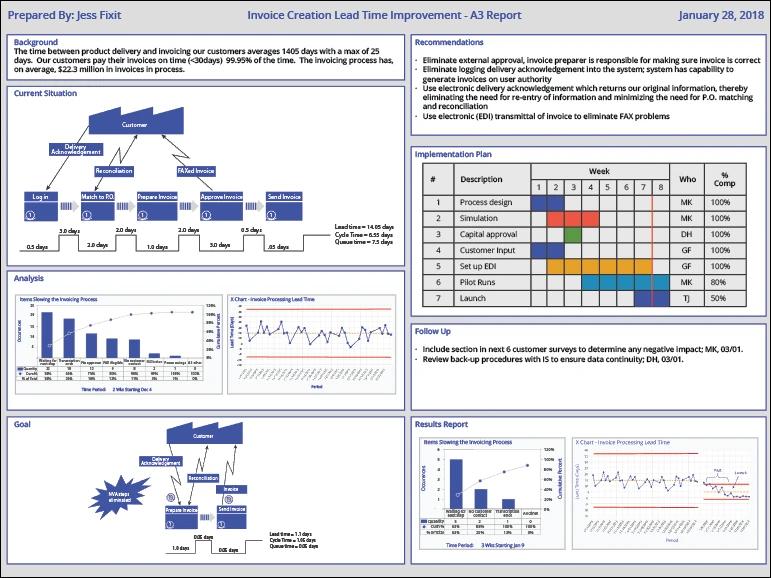
A3 One-Page Reports typically include:
- Background - A brief description of the problem, highlighting the importance to the organization and the measures used.
- Current Situation - Visual depictions of the problem under consideration.
- Analysis - The analysis performed to determine root cause or causes.
- Goal - A visual description of what the situation would need to be so the problem does not reoccur.
- Recommendations - The solution that will be (or has been) implemented.
- Implementation Plan - Tasks, start dates, duration, responsibilities, and completion status (this is optional when the A3 Report is used as a progress tracking report).
- Follow-Up - Post-implementation tasks to ensure solution benefits are maintained.
- Results Report - Charted progress to plan with implementation and measures (this report is also optional when the A3 Report is used as a progress tracking report).
An A3 Report is Not Just a Form
A frequent misstep is focusing on filling out boxes rather than using the A3 report as a thinking and communication tool. When the report format becomes the goal, teams may rush to conclusions, skip meaningful analysis, or miss opportunities.
Used well, an A3 helps teams slow down, make assumptions visible, and build shared understanding. When used poorly, the A3 report just becomes paperwork.
For a deeper look at why this happens and how to avoid it, read A3 Thinking and Non-Thinking.
A3 Report Examples in Real-World Use
After understanding the structure of an A3 report, the real value comes from seeing how the report is used to align teams during improvement work.
In real settings, A3 reports are rarely static. They are reviewed collaboratively and refined as understanding improves. Teams often revisit earlier sections as new data emerges or assumptions are tested, using the A3 as a shared reference rather than a finished deliverable.
If you’d like to see examples of how teams apply the A3 report in real situations, these resources provide additional perspective:
- Accessible A3 Problem Solving – A webinar that walks you through practical use of the A3 report in real improvement scenarios
- What Is A3 Problem Solving – An explanation of how the A3 report fits into a broader improvement approach
Summary
An A3 Report identifies and communicates critical project information while supporting effective decision-making. Designed to fit on a single page, the A3 helps teams clarify problems, align on analysis, and track progress in a clear, consistent format. It is a Lean tool best suited for relatively short-duration Kaizen improvement activities andmay be less effective in more complex projects, such as those typically addressed through the DMAIC framework.
For many organizations, the A3 report is a starting point. Using A3 reports well over time often depends on shared understanding and consistent application across teams. For those looking to deepen that capability, An A3 Problem Solving Course provides additional context and practice beyond the report itself.